Pay-Once AI Video Editor for Mac
Reelify AI is a pay-once video editor for short-form clips on Mac. It finds the moments worth keeping in a long video, then lets you trim, caption, reframe to 9:16, and export them. It is free forever on Mac, with no watermark and no credit card. Creator is $59 once, with no subscription, if you want unlimited exports from every video. Your video stays on your Mac.
Free forever. No watermark, no credit card. For Apple Silicon Macs.
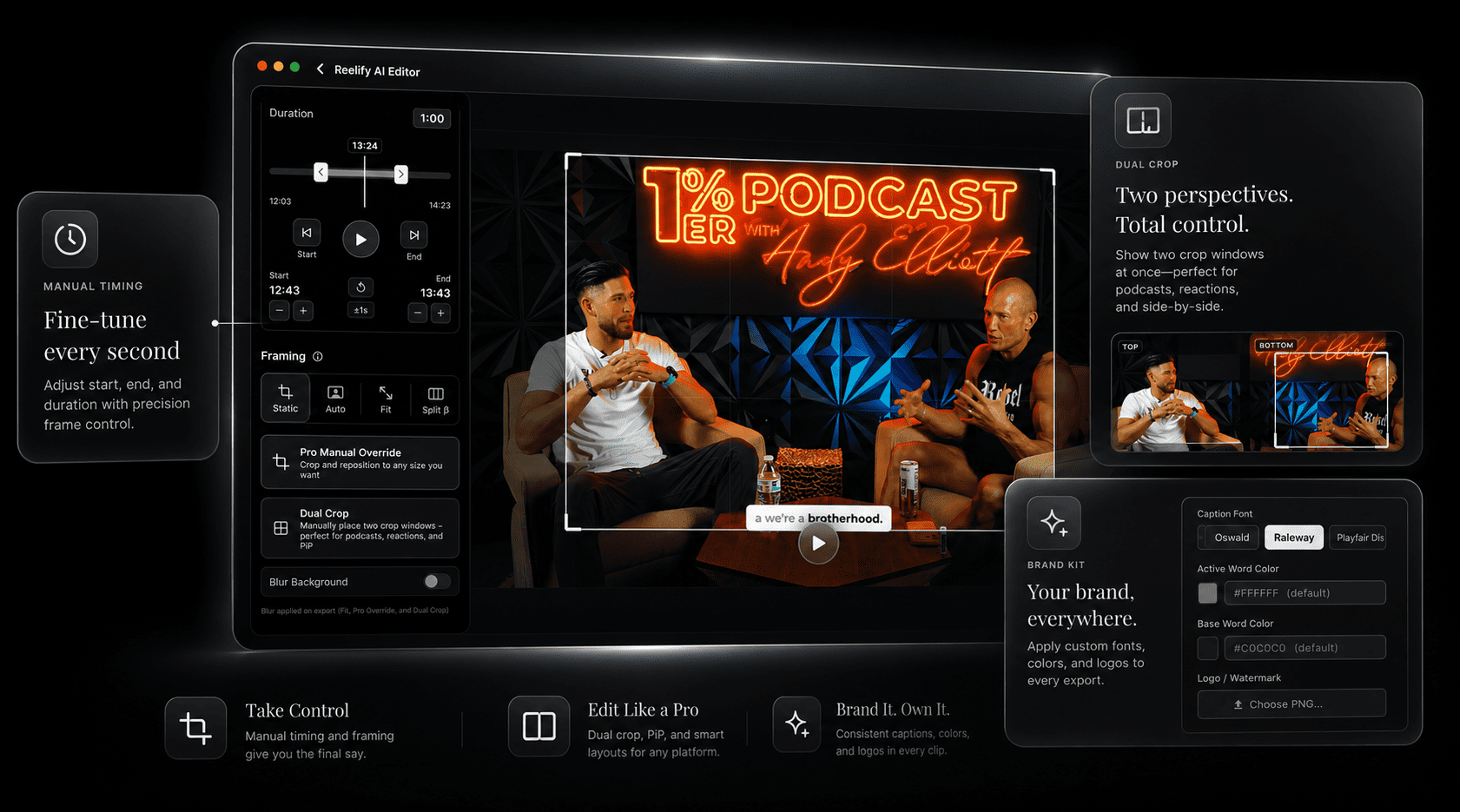
Reelify pay-once editor at a glance
- Type of editor
- Short-form clip editor. Not a multi-track timeline editor.
- Editing tools
- Trim timing, framing and dual crop, caption styling, brand kit
- Output
- Captioned vertical 9:16 clips for TikTok, Instagram Reels, and YouTube Shorts
- Price
- Free forever on Mac, or $59 once for Creator
- What it covers
- Creator adds unlimited exports from every video, all caption styles, and the full editing suite. No subscription.
- Free option
- Free forever: unlimited video imports, AI clipping on every video, 1080p exports with no watermark. No credit card.
- Processing
- On your Mac. The video is not uploaded.
- Requirements
- Apple Silicon Mac (M1 or newer), macOS 15 or later
Pricing as of October 2026.
What you can edit
The editor is built around one job: taking a clip the AI found and making it ready to post. These are the controls in the editor view.
| Control | What it does |
|---|---|
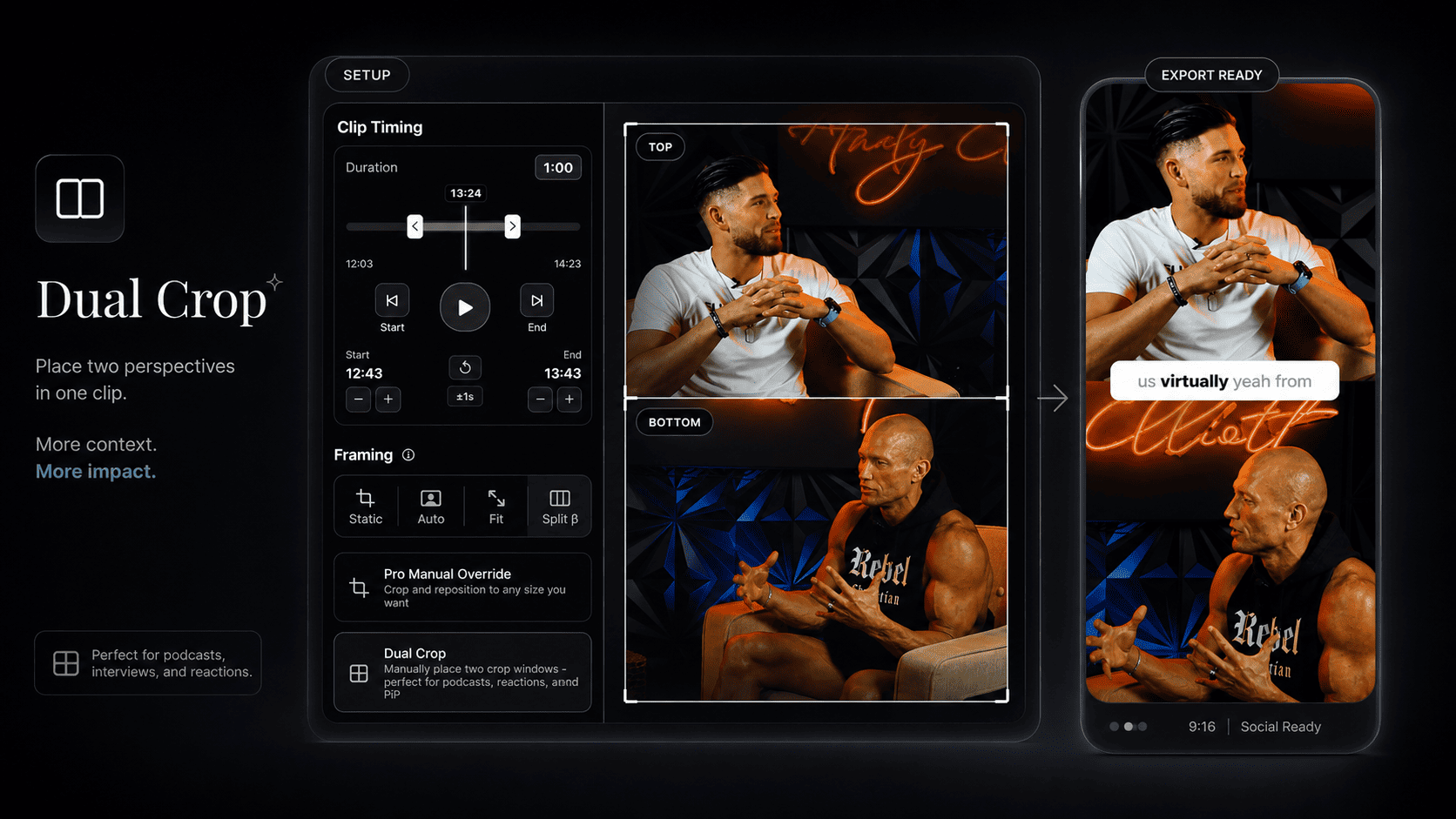
| Clip timing | Set the start and end of a clip to the second, with a duration readout. |
| Framing | Choose static, auto, fit, or split framing, or override the crop by hand. |
| Dual crop | Place two crop windows on one source, which suits podcasts, reactions, and side-by-side shots. |
| Captions | Pick the caption font and the colors of the active and base words. |
| Brand kit | Save caption styling and a logo or watermark, then reuse it across projects. |
| Export | Export one clip or all of them in vertical 9:16. |
What it does not do
Reelify is for the clip layer. Use a full editor when the job is bigger than that.
What it is built for
- Trimming and polishing clips cut from long recordings
- Captions and vertical reframing for Shorts, Reels, and TikTok
- Repeatable caption styling across a weekly show
- Keeping unreleased footage on your own Mac
Use another editor for
- Multi-track timelines and multi-camera switching
- B-roll, effects, and color grading
- Audio mixing and long-form or feature-length edits
- Windows or Intel Macs. There is a Windows waitlist.
The pay-once terms, plainly
Pay-once here means one payment and no subscription. The Free plan costs $0 on Mac.
| Plan | Price | Billing | AI clipping | Exports |
|---|---|---|---|---|
| Free | $0 | No credit card | AI clipping on every video | 1080p exports, no watermark |
| Creator | $59 once | One payment. No subscription. | Unlimited, no credits | Unlimited exports from every video, all caption styles |
| Starter | $15 per month | Monthly subscription | Unlimited | Unlimited exports from every video, all caption styles |
Pay-once compared with subscription editors
| Factor | Subscription editors | Reelify Creator |
|---|---|---|
| Billing | Monthly or annual renewal | $59 once, no auto-renewal |
| Scope | Often a full editor with features you may not use | Short-form clip editing only |
| Processing | Often cloud-based, with uploads | On your Mac, no upload |
| Export watermark | Often on free tiers | None, including the Free plan on Mac |
| Platform | Varies | Apple Silicon Mac only |
If you are weighing this against Descript specifically, see the Descript alternative page. For caption-focused tools, see the Submagic alternative page.
The editing workflow
Import a long video
Drop in a podcast, interview, or stream recording.
Review suggested clips
Key Moments lists each suggested clip with a time range, title, and hook note.
Trim, frame, and caption
Adjust timing, pick a framing mode or dual crop, and style the captions.
Export on your Mac
Save clips locally, with no upload queue.
See the workflow in 18 seconds
This short demo shows a video being dropped into Reelify, the clips screen listing the suggested moments, and a simple clip exported with captions. It has no audio.
Frequently asked questions
Is there a pay-once AI video editor for Mac?
Yes. Reelify AI is a short-form clip editor for Mac. It is free forever with no watermark and no credit card. Creator is $59 once, with no subscription, and adds unlimited exports from every video, all caption styles, and the full editing suite.
Is Reelify a full multi-track editor?
No. Reelify finds, trims, reframes, and captions clips. It is not a timeline editor, so multi-camera switching, b-roll, effects, and color work still belong in a dedicated editor.
What edits can I make to a clip?
You can set the start and end time, choose a framing mode or dual crop, style the captions, and apply a saved brand kit with your fonts, colors, and watermark.
Can I try the editor before buying?
Yes. Reelify for Mac is free forever, with unlimited video imports, AI clipping on every video, and 1080p exports with no watermark. No credit card and no time limit.
Does my video get uploaded?
No. The video file is processed on your Mac. According to the privacy policy, optional cloud AI features may send only the text transcript, never the video.
Edit your first clip free
Run a real recording through the free plan, then trim and caption a clip in the editor. No credit card needed. When you want unlimited exports from every video, Creator is $59 once, no subscription.
Apple Silicon Mac, macOS 15 or later. Rated 4.9★ on the App Store.